Advanced Command Line PDF Stamper 1.6
Download FREE trial version Buy Now - $24.99 USD 





Advanced Command Line PDF Stamper is a scriptable .exe utility that automates stamping of PDF documents with single-line or multiple-line verbiage. The application, aclpdfstamp.exe, has no graphical user interface, automatically locates all PDF documents in the input directory and its subdirectories, duplicates input subdirectories in output directory, allows assignment of stamp verbiage, stamp location, stamp font, stamp font color, stamp font size and specific point X and Y coordinates. The Advanced Command Line PDF Stamper installer includes a helper application, aclpdfstamphelper.exe, that provides graphical user interface for generation of script and batch files to be used with aclpdfstamp.exe. Download sample stamped PDF text document and PDF image document. View user guide (PDF).
 "C:\Program Files\AdvancedReliableSoftware\AdvancedCommandLinePdfStamper\aclpdfstamp.exe"
 <mode> <input directory that contains PDF documents> <output directory>
 <stamp above or beneath content> <stamp verbiage> <stamp location> <stamp font name>
 <stamp font color> <stamp font size> <bold stamp font> <italic stamp font>
 <optional specific point X-coordinate> <optional specific point Y-coordinate>

<mode>
-h   Displays command syntax.
-s   Stamps output PDF documents.

<input directory that contains PDF documents>
Application will attempt to perform work on each PDF document found in the input directory
and its subdirectories. All input PDF files will remain in their original condition.

<output directory>
Output directory for the stamped PDF files.

<stamp above or beneath content>
1 = Stamp above existing content. 2 = Stamp beneath existing content. Refers to z-dimension.

<stamp verbiage>
Stamp verbiage e.g. "All Rights Reserved". Enclose in quotes.
Use \n to force new line in PDF stamp.

<stamp location>
1 = Top Left. 2 = Top Center. 3 = Center Left. 4 = Center. 5 = Bottom Left.
6 = Bottom Center. 7 = Specific Point.

<stamp font name>
Stamp font name e.g. "Arial". Enclose in quotes.

<stamp font color>
32-bit ARGB stamp font color. Use helper GUI application to generate 32-bit ARGB value for
your color.

<stamp font size>
Stamp font size e.g. 12.

<bold stamp font>
1 = Yes. 2 = No.

<italic stamp font>
1 = Yes. 2 = No.

<optional specific point X-coordinate>
X-coordinate for Specific Point stamp location.

<optional specific point Y-coordinate>
Y-coordinate for Specific Point stamp location.

Examples:
"C:\Program Files\AdvancedReliableSoftware\AdvancedCommandLinePdfStamper\aclpdfstamp.exe"
-s "C:\Input" "C:\Output" 1 "Confidential\nInformation" 4 "Times New Roman" -65536 24 1 1 0 0

"C:\Program Files\AdvancedReliableSoftware\AdvancedCommandLinePdfStamper\aclpdfstamp.exe"
-s "C:\Input" "C:\Output" 1 "Confidential\nInformation" 7 "Arial" -16777216 24 1 1 50 150
- Create PDF watermark
- Create PDF stamp
- Add watermark to PDF files
- Add watermark to PDF documents
- Add PDF stamp
- Add PDF stamp to PDF files
- Add stamp to PDF documents
- Stamp PDF file
- Stamp PDF files
- Stamp PDF documents
- Watermark PDF file
- Watermark PDF files
- Watermark PDF documents
- PDF stamper software that does not require Adobe Acrobat
- Software to stamp PDF files that does not require Adobe Acrobat
- PDF watermark creator that does not require Adobe Acrobat
- Software to watermark PDF files that does not require Adobe Acrobat
- Acrobat watermark multiple PDF
- Scriptable, command line PDF stamper software that does not require Adobe Acrobat
- Scriptable, command line PDF watermarking software that does not require Adobe Acrobat
Related products: Advanced Bulk PDF Watermark Creator
Upgrade information: FREE major and minor version upgrades with purchase of an individual, volume or site license.
Supported operating systems: Windows XP Home Edition, Windows XP Professional, Windows XP Starter, Windows XP Media Center Edition, Windows Server 2003 Standard Edition, Windows Server 2003 Enterprise Edition, Windows Server 2003 Datacenter Edition, Windows Server 2003 Web Edition, Windows Vista Home Basic, Windows Vista Home Premium, Windows Vista Business, Windows Vista Ultimate, Windows Vista Enterprise, Windows Server 2008 Standard, Windows Server 2008 Enterprise, Windows Server 2008 Datacenter, Windows Web Server 2008, Windows Server 2008 R2 Standard, Windows Server 2008 R2 Enterprise, Windows Server 2008 R2 Datacenter, Windows Web Server 2008 R2, Windows 7 Starter, Windows 7 Home Basic, Windows 7 Home Premium, Windows 7 Professional, Windows 7 Enterprise, Windows 7 Ultimate, Windows Server 2012 Foundation, Windows Server 2012 Essentials, Windows Server 2012 Standard, Windows Server 2012 Datacenter, Windows Server 2012 R2 Foundation, Windows Server 2012 R2 Essentials, Windows Server 2012 R2 Standard, Windows Server 2012 R2 Datacenter, Windows Server 2016 Essentials, Windows Server 2016 Standard, Windows Server 2016 Datacenter, Windows Server 2019 Essentials, Windows Server 2019 Standard, Windows Server 2019 Datacenter, Windows 8, Windows 8 Pro, Windows 8 Enterprise, Windows 8.1, Windows 8.1 Pro, Windows 8.1 Enterprise, Windows 10 Home, Windows 10 Pro, Windows 10 Enterprise, Windows 11 Home, Windows 11 Pro, Windows 11 Enterprise
End User License Agreement (EULA): Read product's EULA
How to uninstall: Go to Control Panel -> Programs -> Uninstall a Program. Find application's name. Right-click application's name and select Uninstall option.
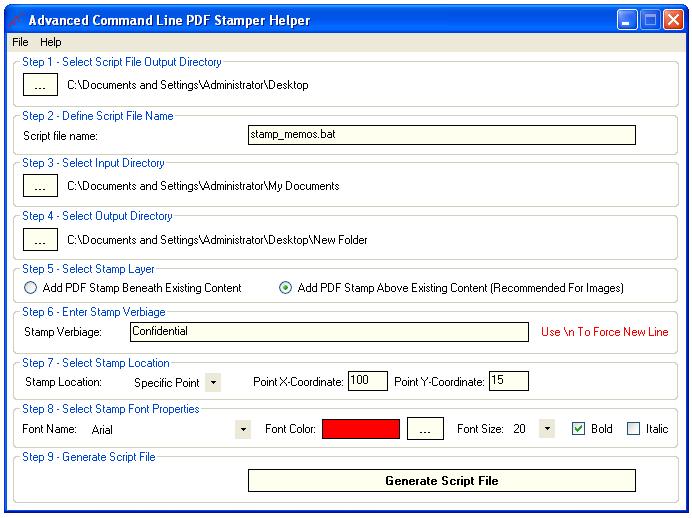
Start using Advanced Command Line PDF Stamper today by following these simple steps:
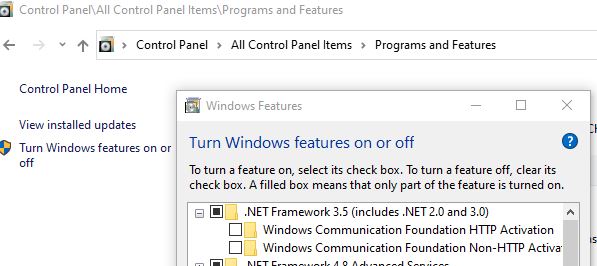
Step 1: Go to "Control-Panel -> Programs and Features -> Turn Windows features on or off" and confirm that .NET Framework 3.5 is enabled:
Step 2: Download and install a FREE trial version of Advanced
Command Line PDF Stamper:
 Windows Installer Package (.msi)
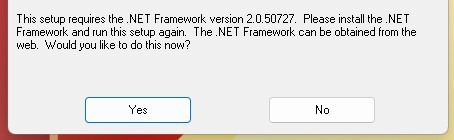
Step 3: If double-clicking .msi installer results in below error message perform action from Step 1 and try again.
Step 4: Purchase Advanced Command Line PDF Stamper individual license and get redirected to our online activation code request form.
To pay with
please use one of our secure shopping carts. Please make sure to provide your e-mail address in order to obtain transaction receipt. Transaction receipt will be required to request e-mail delivery of your activation code(s).
Please read our privacy policy.
Price: $24.99 USD
Digital download only.
Corporate, volume or site licensing
1) Negotiable volume or site license pricing is available, based on the number of end users. Please contact Sales for details.
2) Any licensing inquiries should be directed to:
sales@advancedreliablesoftware.com
Advanced Command Line PDF Stamper is an ideal software solution to:
- Add watermark PDF
- Add watermark to PDF
- Add a watermark to a PDF
- Add watermark to PDF file
- Add watermarks to PDF
- Add PDF stamp
- Add stamp to PDF
- Stamp PDF
- Stamp PDF file
- Stamp PDF files
- Watermark PDF file
- Watermark a PDF
- Watermark in PDF
- Watermark in PDF file
- Watermark on PDF
- Watermark on a PDF
- Adding watermark to PDF
- Adding a watermark to a PDF
- Adobe PDF stamp
- Batch watermark PDF
- PDF stamps
- PDF stamping
- PDF stamper
- PDFstamper
- PDF watermark
- PDF watermark creator
- PDF watermarks
- Adobe PDF watermark
- How to watermark a PDF
- Watermarks in PDF
- Watermarks on PDF
- Watermarking PDF
- Add watermark to existing PDF files
- .PDF stamp bulk
- .PDF watermark bulk
- Acrobat individualized watermark
- Add a sample watermark to a PDF document
- Add a stamp to PDF
- Add PDF watermark
- Add PDF watermarker
- Add stamp to PDF
- Add watermark advanced
- Add watermark to PDF print
- Adding a watermark to a .PDF file
- Adding a watermark to a PDF document
- Adding a watermark to PDF files
- Bulk water mark software
- Bulk watermark app
- Bulk watermark PDF
- Bulk watermarking documents
- How to create water mark in PDF file
- PDF water mark creator
- PDF watermark
- PDF watermark creator
- PDF watermark Windows XP
- PDF watermarking software
- Software to add watermark to PDF
- How to watermark multiple PDF documents
- How to add watermark in adobe pdf
- How to add watermark multiple documents acrobat
- How to add watermark to adobe pdf
- How to add watermark to pdf
- PDF bulk stamp creator
- PDF bulk stamping
- PDF bulk watermark
- Watermark creator for acrobat
- Watermark multiple pdf files
- Watermark pdf files
- Watermarking pdf automatically